


Vertica - Multi Execute
Overview
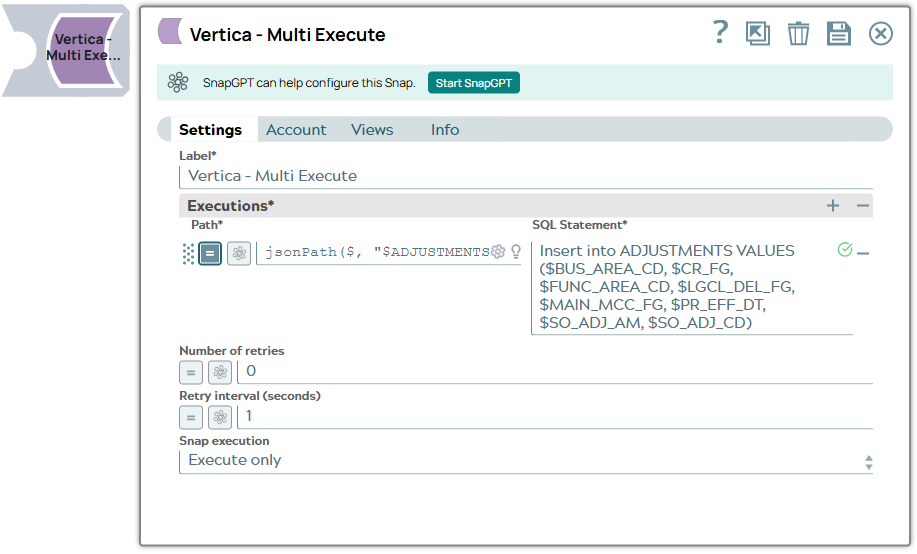
The Vertica - Multi Execute Snap allows you to execute multiple SQL statements for each document.
- Multiple documents cannot be executed as part of one transaction; the relationship is one transaction per document.
- The account being used must have auto commit set to false, otherwise the Snap will fail with a configuration exception. You can drop your database with it, so be careful.
- This is a Write-type Snap.
 Works in Ultra Tasks
Supported Accounts
Snap views
| Type | Description | Examples of upstream and downstream Snaps |
|---|---|---|
| Input |
This Snap has exactly one document input view. |
|
| Output |
This Snap has at most one document output view. |
|
| Learn more about Error handling. | ||
Snap settings
- Expression icon (
 ): Allows using
pipeline parameters to set field values dynamically (if enabled). SnapLogic Expressions
are not supported. If disabled, you can provide a static value.
): Allows using
pipeline parameters to set field values dynamically (if enabled). SnapLogic Expressions
are not supported. If disabled, you can provide a static value. - SnapGPT (
 ): Generates SnapLogic Expressions
based on natural language using SnapGPT. Learn
more.
): Generates SnapLogic Expressions
based on natural language using SnapGPT. Learn
more. - Suggestion icon (
 ): Populates a
list of values dynamically based on your Snap configuration. You can select only one
attribute at a time using the icon. Type into the field if it supports a comma-separated
list of values.
): Populates a
list of values dynamically based on your Snap configuration. You can select only one
attribute at a time using the icon. Type into the field if it supports a comma-separated
list of values. - Upload
 : Uploads files. Learn more.
| Field/Field set | Description |
|---|---|
| Label
|
Specify a unique name for the Snap. Modify this to be more appropriate, especially if more than one of the same Snaps is in the pipeline. Default value: Vertica Multi Execute Example: Vertica Multi Execute |
| Executions
|
Required. Specify a list of
statements that are executed as one transaction.
Examples: Without using expressions:
Using expressions:
Warning: Using expressions that join strings together to create SQL
queries or conditions has a potential SQL injection risk and is hence unsafe.
Ensure that you understand all implications and risks involved before using
concatenation of strings with '=' Expression enabled. Warning:
Single quotes in values must be escaped Any relational database (RDBMS) treats single quotes ( For example:
Default value: N/A |
| Number of retries
|
Specify the maximum number of times that the
process must be retried before displaying an error. Default value: 0 Example: 2 |
| Retry interval (seconds)
|
Specify the maximum resting time in seconds
between subsequent retries. Default value: 1 Example: 2 |
| Snap Execution
|
Choose one of the three modes in which the Snap executes. The available options are: Validate & Execute: Performs limited execution of the Snap and generates a data preview during pipeline validation. Subsequently, performs full execution of the Snap (unlimited records) during pipeline runtime. Execute only: Performs full execution of the Snap during pipeline execution without generating preview data. Disabled: Disables the Snap and all Snaps that are downstream from it. Default value: Execute only Example: Validate & Execute |