


NetSuite REST Check Async Status
Overview
You can use this Snap to retrieve the current status of an asynchronous job submitted to NetSuite through the REST API.
When you deselect Poll async job results in a NetSuite REST Snap that has Enable asynchronous request processing selected, the Snap writes the job submission response without waiting for the job to complete. Use this Snap downstream to check whether the job has completed, and then use the NetSuite REST Get Async Result Snap to retrieve the job results.
This Snap is the REST equivalent of the NetSuite Check Async Status Snap in the NetSuite SOAP Snap Pack.
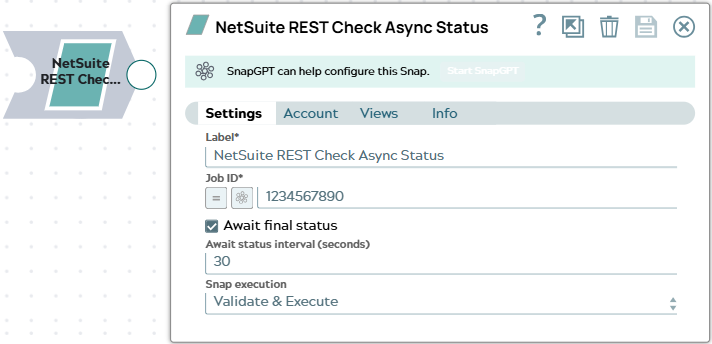
- This is a Read-type Snap.
 Works in Ultra Tasks
Prerequisites
- The ID of an asynchronous job submitted to NetSuite, such as the
idfield in the output of a NetSuite REST Snap that submits an asynchronous request.
Limitations and known issues
- When you select Await final status, the Snap waits for at most 5 minutes for the job to complete. If the job is still pending or processing after 5 minutes, the Snap writes an error document to the error view.
Snap views
| Type | Description | Examples of upstream and downstream Snaps |
|---|---|---|
| Input | This Snap has exactly one document input view. Each input document supplies the value for the Job ID expression. | |
| Output |
This Snap has at the most one document output view.
Each output document contains the job status that NetSuite returns, including the id, progress, completed, startTime, and endTime fields, and the links to the job tasks.
Each output document also includes the input document in the original field.
|
|
| Learn more about Error handling. | ||
Snap settings
| Field/Field set | Description |
|---|---|
Label* String |
Specify a unique name for the Snap. Modify this to be more appropriate, especially if more than one of the same Snaps is in the pipeline. Default value: NetSuite REST Check Async Status Example: Check customer upsert job |
Job ID*
String/Expression |
Specify the ID of the asynchronous NetSuite job whose status you want to retrieve. To check a job that an upstream NetSuite REST Snap submitted, map the Default value: N/A Example: |
Await final status
Checkbox |
Select this checkbox to poll NetSuite until the job moves out of the pending or processing state, and write the final job status to the output. Deselect this checkbox to check the job's current status once and write it to the output. Default status: Deselected |
Await status interval (seconds)
Integer |
Appears only when you select the Await final status checkbox Specify the time, in seconds, for the Snap to wait between consecutive status
checks. The minimum value is Default value: 30 Example: 10 |
|
Snap execution Dropdown list
|
Choose one of the three modes in
which the Snap executes. Available options are:
Default value: Validate & Execute Example: Execute only |
Troubleshooting
| Error | Reason | Resolution |
|---|---|---|
| No Job ID is provided. | The Job ID expression evaluates to an empty value for the input document. | Verify that the Job ID expression refers to a field that exists in the input document, such as $id. |
| Failed to execute the NetSuite REST service call, or the endpoint returned an error. | NetSuite cannot find an asynchronous job with the specified ID. The error document shows the reason Got response 404 - Not Found from the endpoint. |
Verify that the Job ID value is correct and that the job was submitted with the same NetSuite account that this Snap uses. |
| Failed to execute the NetSuite REST service call, or the endpoint returned an error. | NetSuite rejected the account credentials. The error shows the reason Got response 401 - Unauthorized from the endpoint. |
Validate the account, and update or reauthorize the credentials if they have expired. |
| Failed to execute the NetSuite REST service call, or the endpoint returned an error. | NetSuite rejected the request. The error document shows the reason as Got response <code> - <status> from the endpoint, along with the details that NetSuite returns. |
Review the details in the error view, and correct the Job ID value or the account settings that NetSuite reports. |
Timed out waiting for NetSuite async job <job ID> |
The job is still in the pending or processing state after 5 minutes. | Deselect Await final status, and check the job status again later. |
Failed to prepare or send NetSuite request (<details>). |
The Snap could not send the request to NetSuite. | Review the details in the error message, and verify the account settings and the network connectivity from the Snaplex to NetSuite. |