


Dropbox Write
This Snap writes binary data to files in Dropbox cloud storage.
Supported Accounts
- This is a Write-type Snap.
 Works in Ultra Tasks
Prerequisites
None.
Limitations and known issues
None.
Snap views
| Type | Description | Examples of upstream and downstream Snaps |
|---|---|---|
| Input |
This Snap has exactly one binary input view. The Snap reads the binary data to write to Dropbox. |
|
| Output |
This Snap has at most one document output view. The Snap outputs metadata about the written file. |
|
| Learn more about Error handling. | ||
Snap settings
Note: Learn about
the common controls in the Snap settings dialog.
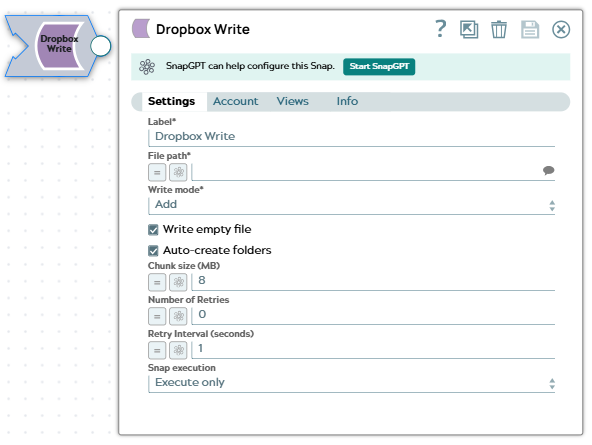
| Field/Field set | Description |
|---|---|
|
Label
|
Specify a unique name for the Snap. Modify this to
be more appropriate, especially if there are more than one of the same Snap in the
pipeline.
Default value: Dropbox Write |
| File path*
|
The destination path for the file in Dropbox. For standard paths, start with a forward slash (/). For shared folders, use the format: folderName/file.pdf without a leading slash.
Example: Default value: None |
| Write mode*
|
Specify how to handle the file if it already exists:
Default value: Add |
| Write empty file
|
Select this checkbox to write empty files to Dropbox. When deselected, empty files are skipped and no output is written.
Default value: Selected |
| Auto-create folders
|
Select this checkbox to automatically create parent folders if they don't exist. When deselected, the Snap fails if the parent folder doesn't exist.
Default value: Selected |
| Chunk size (MB)
|
Chunk size in megabytes for uploading large files (files larger than 150 MB). Valid range: 1-150 MB. Smaller chunks use less memory but require more API calls. Larger chunks are faster but use more memory.
Example: Default value: 8 |
| Number of Retries
|
Specify the maximum number of retry attempts for failed uploads. Setting this greater than 0 automatically enables staging (writes to a temporary file first).
Example: Default value: 0 |
| Retry Interval (seconds)
|
Specify the number of seconds to wait between retry attempts.
Example: Default value: 1 |
| Snap execution
|
Choose one of the three modes in
which the Snap executes. Available options are:
Default value: Validate & Execute |