Salesforce OAuth2 Account
Overview
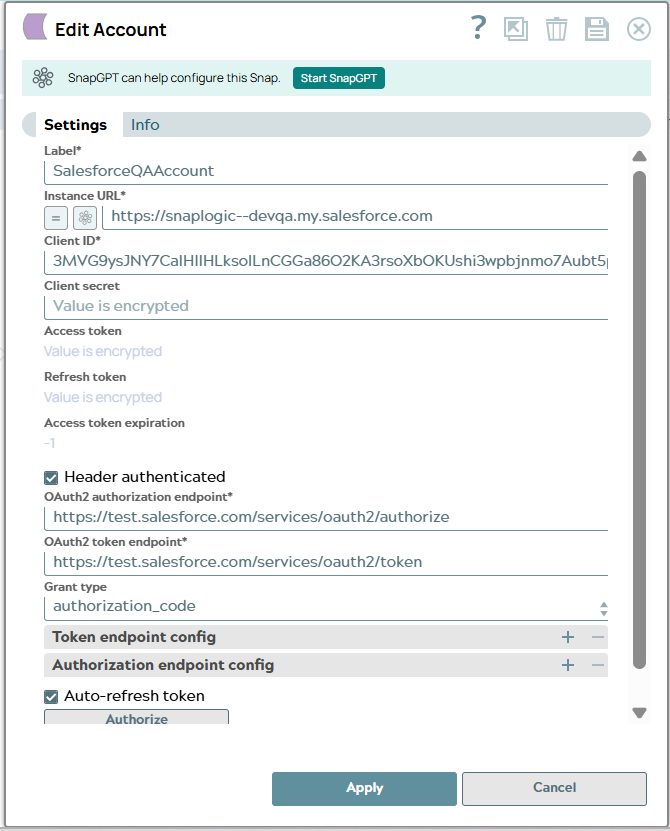
You can configure your accounts in SnapLogic using the Designer or Manager. You can use this account type to connect Salesforce Snaps with data sources that use the Salesforce OAuth2 account.
This account supports the Authorization Grant type. Learn more about OAuth Authorization flows.
Prerequisites
- A Salesforce account.
- An OAuth-connected App in Salesforce with Redirect URL (also known as call-back domain).
https://elastic.snaplogic.com/api/1/rest/admin/oauth2callback/salesforce
Limitations
None.
Account settings
| Field/Field set | Description |
|---|---|
Label*
String |
Required. Specify a unique name for the account. Preferably update the name if your project has multiple accounts of the same type.
Default value: N/A Example: SalesforceOauth2Account |
Instance URL
String/Expression |
Required. Specify the instance URL to access the Salesforce portal.
Default value: N/A Example: |
Client ID
String |
Required. Specify the identification for the client that you obtain from the API Console.
Default value: N/A Example: abcd12345xyz567 |
Client secret
String |
Specify the value for user authentication that is obtained from the API Console.
Default value: N/A Example: <Encrypted> |
Access token
String |
Required. Auto-generated after authorization. The token that SnapLogic uses to make API requests on behalf of the user associated with the client ID. Access tokens have limited lifetimes; you must get a new access token after it expires.
Default value: N/A Example: <Encrypted> |
Access token expiration
Integer |
Auto-generated after authorization.
Note: If there is no expiration date, -1 is the default value. In such cases, the access token is refreshed at a regular interval (every hour).
Default value: N/A Example: -1 |
Header authenticated
Checkbox |
Select this checkbox if the endpoint uses the bearer header authentication.
Default value: Deselected |
OAuth2 authorization endpoint
String |
Required. Specify the endpoint to authorize the application.
Default value: N/A Example:
|
OAuth2 token endpoint
String |
Required. Specify the endpoint to get the access token.
Default value: N/A Example:
|
Grant Type
Dropdown list |
SnapLogic supports Authorization code, Password, and Client Credentials grant types. This grant type is typically used for system-to-system integrations—the token is automatically accepted and generated.
Select the method of authorization:
Default value: authorization_code Example: authorization_code |
| Token endpoint config | Use this field set to define custom properties for the OAuth2 token endpoint. This field set contains the following fields: |
Token endpoint parameter
String |
Specify the parameter for the token endpoint.
Default value: N/A Example: redirect_uri |
Token endpoint parameter value
String |
Specify the value for the token endpoint parameter.
Default value: N/A Example: |
| Authorization endpoint config | Use this field set to define custom properties for the OAuth2 authentication endpoint. This field set contains the following fields: |
Authentication parameter
String |
Specify the parameter for OAuth2 authentication.
Default value: N/A Example: redirect_uri |
Authentication parameter value
String |
Specify the value for the OAuth2 authentication parameter.
Default value: N/A Example: |
Auto-refresh token
Checkbox |
Select this checkbox to enable auto-refresh of the access token before it expires. Learn more about how the SnapLogic Platform handles token refresh failures.
Default value: Deselected |
Troubleshooting
| Error | Cause | Resolution |
|---|---|---|
| 403::Handshake denied; 401::Request requires authentication | The client is not authorized to access the server because of a domain mismatch or authentication failure. | Configure the Enhanced Domain in the Instance URL property to ensure authentication for successful access to the server. |
Access token timeout settings for Salesforce
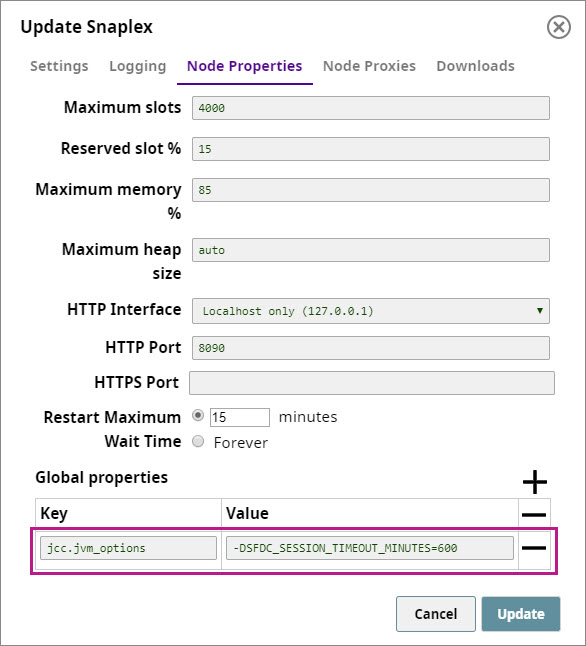
The expiration timeout (or session timeout) in Salesforce is 14 minutes by default. To change this value:
- Navigate to SnapLogic Manager > Asset Search > Snaplexes and click the Snaplex on which you want to execute the pipeline containing the Salesforce Snap. The Update Snaplex popup window appears.
- Click Node Properties and add the following entry into the Global properties field set:
jcc.jvm_options = -DSFDC_SESSION_TIMEOUT_MINUTES=<NUMBER_OF_MINUTES>