


Azure SQL - Bulk Load
Overview
The Azure SQL - Bulk Load Snap performs a bulk load operation from the input view document stream to the target table by using the SQLServerBulkCopy API.
This Snap uses a memory buffer to send records to the target table instead of a temporary CSV file. The Batch size and Bulk copy timeout values can be used to tune the performance and memory used.
This Snap supports a dot (.) as a separator for milliseconds in date and time formats, which helps in handling date and time data types and functions when working with SQL Server (Transact-SQL). Learn more: Date and time data types and functions.
- This is a Write-type Snap.
 Does not support Ultra Tasks
Supported Accounts
Prerequisites
- The Azure SQL database account requires the SQL Server JDBC driver. Version 4.1 and older do not support the SQLServerBulkCopy API.
Limitations
- MicrosoftTM does not support the DateTime data type when writing to Azure Data Warehouse. As a workaround, change the data type from DateTime to varchar when writing to Azure Data Warehouse. Note that if the table does not exist in the database, enabling the Create table if not present property automatically converts all DateTime fields to varchar fields. For more information on this known issue, see Known Limitations for the batch insert operation.
- You cannot modify certain columns in Azure SQL because they might either be computed columns or the result of a UNION operator, such as "InventoryValue."
- The Azure Bulk Load Snap supports the
moneyandsmallmoneydata types only within the following specific ranges:Data Type Range money-922,337,203,685,477.5808 to 922,337,203,685,477.5807 smallmoney-214,748.3648 to 214,748.3647 When you insert a value beyond the specific range, the Snap does not fail but inserts incorrect values. This issue is caused by MSSQL-JDBC dependency from Microsoft, that converts small-money/money values to int/long values. SnapLogic has reported a bug in Microsoft MSSQL-JDBC GitHub repository. You can track the issue here.
The following table shows examples of how out-of-range values are modified during Bulk Load:
Data Type When you update Bulk Load is updated to smallmoney-214758.3648 -214738.3649 money922337203685487.5808 922337203685467.5808
Snap views
| Type | Description | Examples of upstream and downstream Snaps |
|---|---|---|
| Input |
This Snap has at most two document input views. Expected input: All input documents must contain map data with a key-value pair. All keys must be spelled the same as in columns in the target table (case-sensitive). Input documents must not contain any data other than data to be bulk-loaded. All input documents must have the same keys. If the number of keys is smaller than the number of columns in the target table, the Snap fills missing keys with null values. If key names in the input document is different from column names, the Mapper Snap can be used to map key names to column names. |
|
| Output |
This Snap has at most one document output view. Expected output: The input document stream is converted to multiple batches, which are bulk-loaded to the target table by using SQLServerBulkCopy API. The Snap converts the input data values according to the corresponding SQL Server column data types to Java class objects which SQLServerBulkCopy accepts. Outputs the bulk-load result in a key-value pair, for example: Note: When accessing a column name that contains specific characters as supported by Azure SQL, like $, #, @, etc., such field names should be enclosed in the square brackets.
|
|
| Learn more about Error handling. | ||
Examples
- Basic Use Case (Azure SQL Bulk Load): This example demonstrates how to bulk load data from an input stream into the table
"dbo"."datatypetest". - Typical Snap Configurations (Azure SQL Bulk Load): This example demonstrates the key configurations for the Azure SQL - Bulk Load Snap.
- Advanced Use Case: This example demonstrates a broader business logic involving multiple ETL transformations that shows how, in an enterprise environment, Azure SQL Bulk Load functionality is used.
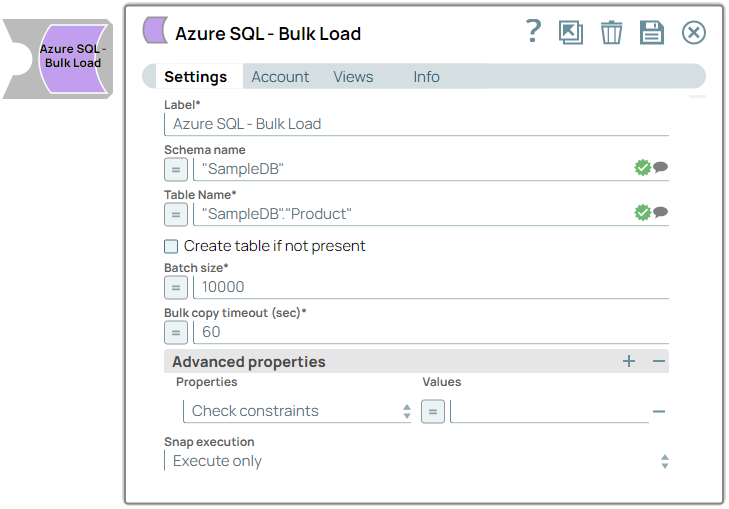
Snap settings
| Field/Field set | Description |
|---|---|
Label
String |
Specify a unique name for the Snap. Modify this to be more appropriate, especially if more than one of the same Snaps is in the pipeline. Default value: Azure SQL - Bulk Load Example: Bulk_Load |
Schema Name
String/Expression/ Suggestion |
The database schema name. If it is not defined, the suggestion for the table name will retrieve all the table names of all schemas. The property is suggestible and will retrieve associated database schemas values.
Note: The values can be passed using the pipeline parameters but not the upstream parameter.
Default value: N/A Example: SYS |
Table Name*
String/Expression/ Suggestion |
Required. Specify the target table to load the incoming data into.
Note: The values can be passed using the pipeline parameters but not the upstream parameter.
Default value: N/A Example: users |
Create table if not present
Checkbox |
Select this checkbox to create a target table in case it does not exist; otherwise, the Snap displays a "table not found" error. In the absence of a second input view (the schema/metadata document), the Snap creates a table based on the data types of the columns generated from the first row of the input document (first input view).
Warning: This should not be used in production since there are no indexes or integrity constraints on any column and the default varchar() column is over 30k bytes.
Note: Due to implementation details a newly created table is not visible to subsequent database Snaps during runtime validation. If you wish to immediately use the newly updated data you must use a child pipeline invoked via a
Pipeline
Execute
Snap.
Default value: Deselected |
Batch size
Integer/Expression |
Sets the number of rows in each batch.
Default value: 10000 Example: 1000 |
Bulk copy timeout (sec)
Integer/Expression |
Sets the number of seconds for each batch operation to complete before it times out.
Note: A value of 0 indicates no limit; the bulk copy will wait indefinitely.
Default value: 60 |
Advanced properties
Fieldset |
Use this field set to configure advanced properties. |
Properties
Dropdown list |
Choose an option for SQLServerBulkCopy. The available options are:
Learn more: SQLServerBulkCopyOptions Default value: N/A |
Values
String/Expression |
The value for the selected property. The default values for each property are:
Default value: false Example: true |
Snap execution
Dropdown list |
Choose one of the three modes in
which the Snap executes. Available options are:
|
In a scenario where the Auto commit on the account is set to true, and the downstream Snap depends on the data processed on an upstream Database Bulk Load Snap, use the Script Snap to add delay for the data to be available.
For example, when performing a create, insert and a delete function sequentially on a pipeline, using a Script Snap helps in creating a delay between the insert and delete function or otherwise it may turn out that the delete function is triggered even before inserting the records on the table.
Troubleshooting
| Error | Cause | Resolution |
|---|---|---|
| com.microsoft.sqlserver.jdbc.SQLServerException | SQL Server error occurred during bulk copy operation. | Refer to Errors 4000 - 4999 for more details on the error code. |