


Google BigQuery OAuth2
Configure a Google BigQuery OAuth2 account to authenticate with Google BigQuery using standard OAuth2 authentication with auto-refresh capability.
Overview
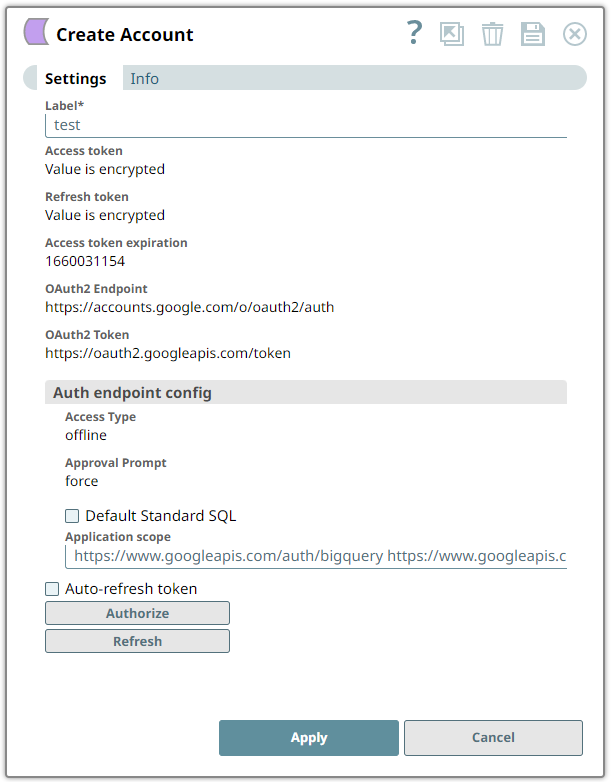
Account Settings
| Field/Field set | Description | ||
|---|---|---|---|
| Label String/Expression |
Required. Specify a unique label for
the account instance. Default value: None Example: |
||
| Access token String |
Required. The access token for the
application is auto-generated after authorization. You receive an
access token when the account is set up for the endpoint. During
setup, the OAuth2 flow is executed, and the access token that gets
generated is stored in this property. If the access token is
refreshed, then the optional refresh token is stored. Get a new
access token, if:
Default value: None. Example: |
||
| Refresh token String |
The application's refresh token gets
auto-generated during the authorization. You receive a refresh token
when the account is set up for the endpoint. During setup, the
OAuth2 flow is executed, and the refresh token that is generated is
stored in this property. If the refresh token is already stored,
then the access token can be refreshed automatically before it
expires. Default value: None. Example: |
||
| Access token expiration String |
The access token expiration value
gets auto-generated on the authorization. The expiration is
retrieved when setting up the account for the endpoint. There, the
OAuth2 flow is executed, and the resulting expiration is stored in
this property. Default value: None. Example: 16942198634 |
||
| OAuth2 Endpoint String/Expression |
Required. Authorization endpoint to
authorize the application. Default value: https://accounts.google.com/o/oauth2/auth |
||
| OAuth2 Token String/Expression |
Required. Token endpoint to get the
access token. Default value: https://accounts.google.com/o/oauth2/token |
||
| Auth endpoint config Provides custom properties for the OAuth2 auth endpoint. |
|||
| Access Type String/Expression |
The access type for the token. If
you are offline, then it will persist in the account. Default value: offline |
||
| Approval Prompt String/Expression |
The approval type for the
token. force |
||
| Default Standard SQL Checkbox |
Select this checkbox to default the
dialect in the Query field of the Snaps using this account to
Standard SQL. Note: To override this default setting, use the
#legacySQL tag within the Query
field of the Snap to treat it as a Legacy SQL
query.Default: Deselected |
||
| Application scope String/Expression |
Specify the scope for the
application execution. For example, allow only read access by the
application as a scope. Default value: https://www.googleapis.com/auth/dfareporting Example: https://www.googleapis.com/auth/cloud-platform |
||
| Auto-refresh token Checkbox |
Select this checkbox to
automatically refresh the token. Otherwise, it might expire and will
not be automatically refreshed. Learn more about how the SnapLogic Platform handles token refresh failures. Default value: Deselected |
||
| Authorize Button |
When you click Authorize, the OAuth2 authorization flow begins; the account is saved before authorizing. SnapLogic fetches the Access token, Refresh token, and Access token expiration details and populates these fields with the generated values. | ||
| Refresh Button |
Refresh access token is available after the account has been saved. | ||