


Application configuration in Azure Portal for the Power BI OAuth2 account
The Snaps in the Microsoft Power BI Snap Pack require a Power BI OAuth2 account to access Azure resources. To authorize the OAuth2 account successfully, create and configure an application corresponding to the account, as shown in the following workflow.

-
Define the permissions for the application.
-
On the left navigation panel, navigate to .

-
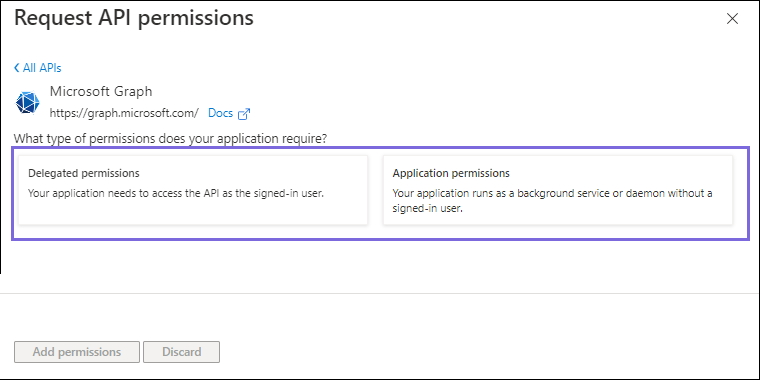
On the Request API permissions window, select for the OAuth2 application account.
-
Click Add permissions.
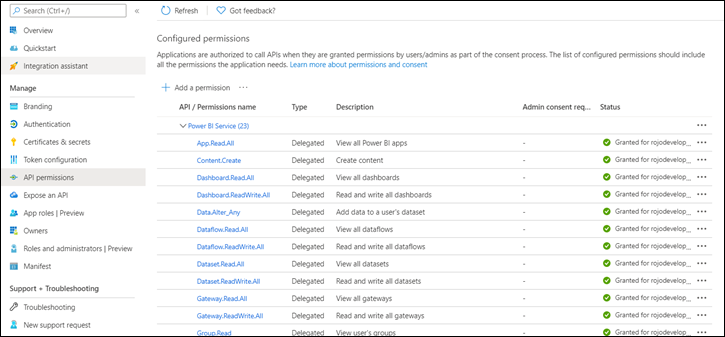
All the permissions that you added appear under Configured permissions. -
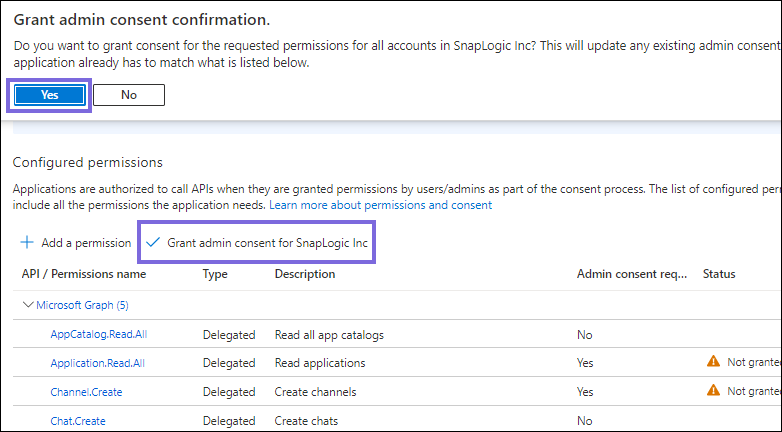
Click Grant admin consent and select
Yes in the confirmation dialog.
-
Click Overview and select Add a Redirect
URI.
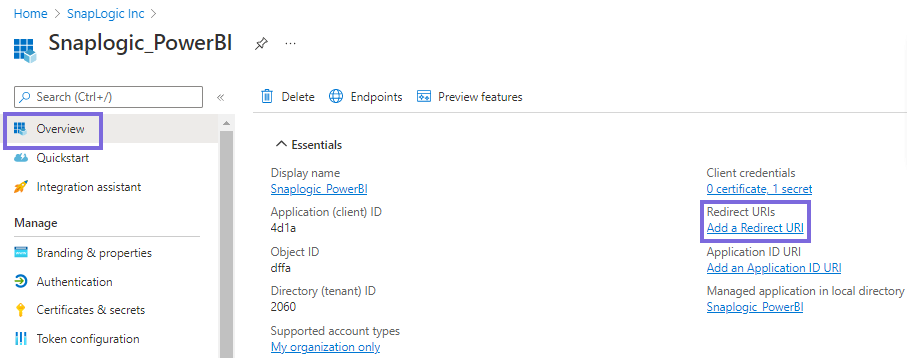
The Platform configurations page appears. -
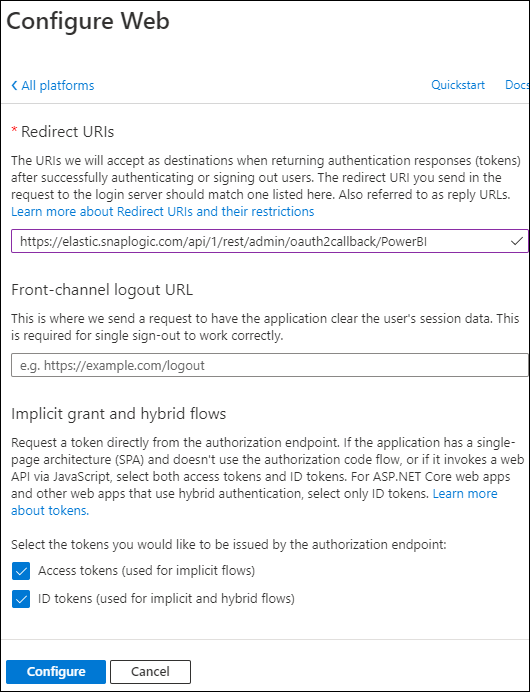
Select Web, specify a valid redirect URI, and click
Configure.
Example:
https://elastic.snaplogic.com/api/1/rest/admin/oauth2callback/PowerBI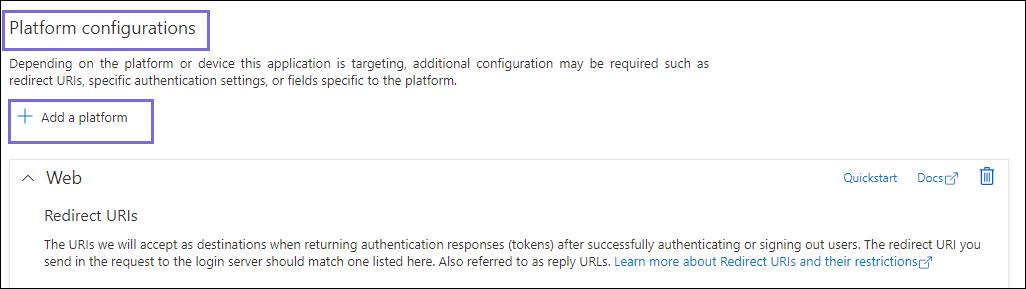
A message confirms that the application is updated successfully. -
On the Platform configurations page, click
Save.
Scopes and permissions required
Permission Display String Description Admin Consent Required? Application.Read.AllApplication.Read.AllAllows the app to read applications and service principals on behalf of the signed-in user. Yes AppCatalog.Read.AllAppCatalog.Read.AllAllows the app to read the apps in the app catalogs. No -
On the left navigation panel, navigate to .
-
Locate the application credentials in the Azure Portal.
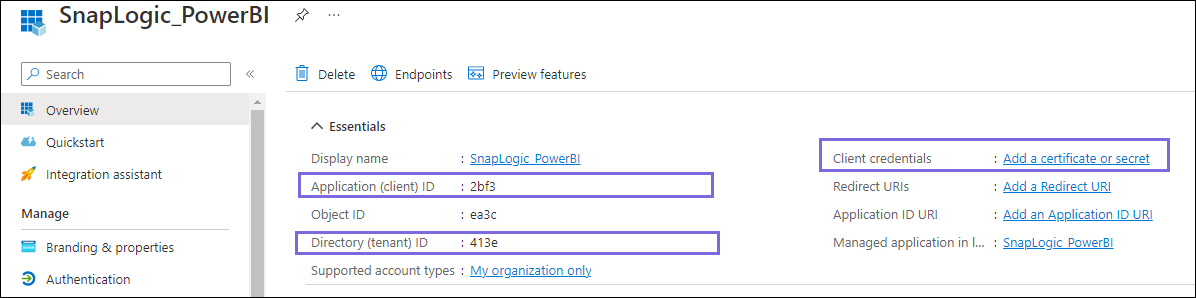
To authorize your account in SnapLogic, you must have the following application credentials:
- Application (client) ID
- Directory (tenant) ID
- Client secret value
-
On the application page, under Essentials, note the
Application (client) ID and Directory (tenant)
ID that the Snap account requires.
-
In the Add a client secret window, enter the
Description, select an option for
Expires from the dropdown list, and click
Add.
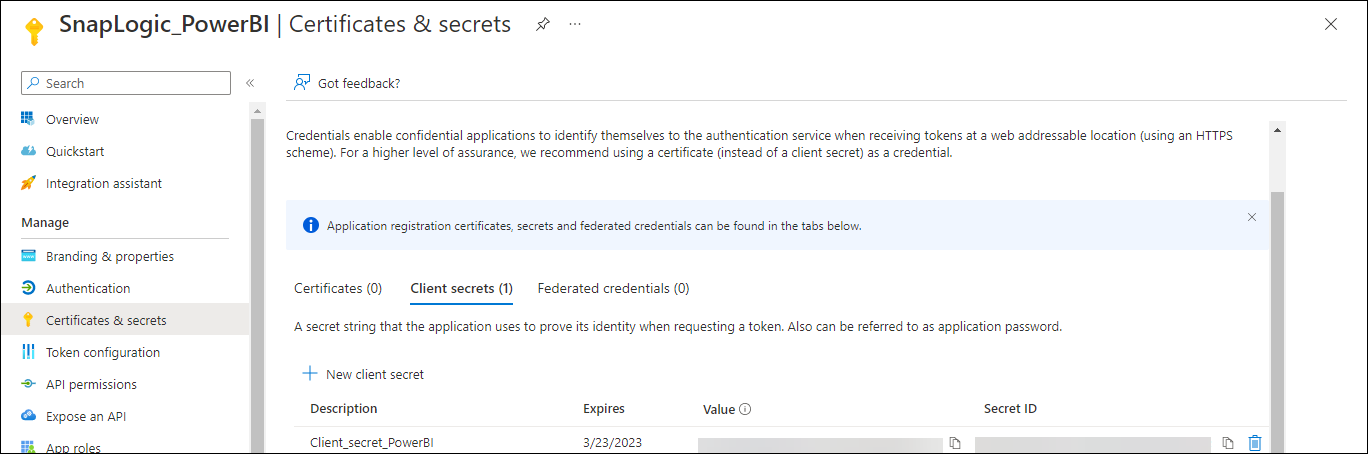
Note: You can copy the client secret value only after it is generated. This value is displayed only once, so ensure that you copy it securely.The client secret value and ID are generated. This value and the ID are required to configure the OAuth2 account.
Error 401
The token is invalid.
Provide a valid token and reauthorize the account.
The redirect URI specified does not match the reply URI configured for the application.
You specified an incorrect redirect URI.
Add the following redirect_uri:
https://elastic.snaplogic.com/api/1/rest/admin/oauth2callback/PowerBI
URL error when invoking the operation
The tenant domain name is incorrect.
Ensure that the Directory (tenant) ID that you noted from the application is in the correct format. For example, 2060aafa-89d9-423d-9514-eac46338ec05.
Frequently Asked Questions
Can we use an existing registered application to add an account to the Snap?
Yes. You can register a new application or use an existing application in the Azure Portal to create an OAuth2 account. See step 1, Create an application in the Azure Portal. For more information, see Register a client application in Microsoft Entra ID.
Where can I find examples of the Application ID, Tenant ID, and Secret key values?
Step 3, Locate the application credentials in the Azure Portal, shows where to find the application ID, client ID, and secret key values. For more information, see Power BI OAuth2 Account.
Where do I find more support for account-related information and other issues?
Contact the SnapLogic support team. The help icon in the Snap provides reference information for the selected Snap.
What type of permission does the registered application need?
The Scopes and permissions required table lists the delegated and application permissions that Azure Active Directory requires. For any other permissions that your application needs, see Microsoft Graph permissions reference.
How many accounts does the Microsoft Power BI Snap Pack have?
The Microsoft Power BI Snap Pack has one account type. Use the Power BI OAuth2 account to connect Power BI Snaps with data sources. For more information, see Power BI OAuth2 Account.