


Lead Read
Overview
You can use the Lead Read Snap to query the Lead database. Lead database objects include the following:
- Leads
- Companies
- Named Accounts
- Named Account List
- Static List
- Usage
- Opportunities
- Opportunity Roles
- Sales Persons
- Custom Objects
- Activities
- List and Program Membership
- This is a Read-type Snap.
 Works in Ultra Tasks
Prerequisites
- A valid account with the required permissions. For more info, see Roles and Permissions.
Limitations
- Daily quota: 50,000 API calls per day.
- API rate limit: 100 calls per 20 seconds. If exceeded, the API responds with a 606 error code and the Snap fails.
- Concurrency limit: 10 concurrent API calls.
- Marketo Snaps do not support some special characters (for example, (𝖖𝖗𝖘𝖬𝖭𝖮𝗕𝗖𝘧𝘨𝘩𝛀𝛁𝛂𝛃𝛄𝛅𝛆𝛇,𝖗𝖘𝖬𝛌𝛗𝛘𝛙𝛴)).
Known issues
- The Get Lead Activities REST API call fails while getting activities for the first page, because it expects a
nextPageTokenon the first page. - If the API rate limit of 100 calls per 20 seconds is exceeded, the API responds with a 606 error code and the Snap fails.
- Marketo Snaps do not support some special characters (for example, (𝖖𝖗𝖘𝖬𝖭𝖮𝗕𝗖𝘧𝘨𝘩𝛀𝛁𝛂𝛃𝛄𝛅𝛆𝛇,𝖗𝖘𝖬𝛌𝛗𝛘𝛙𝛴)).
- The Marketo Lead Read Snap has the checkbox Read All Pages, which does not apply to all the commands. A few commands (such as Get Paging Token, Member of List) do not support pagination due to the API limitation.
Snap views
| Type | Description | Examples of upstream and downstream Snaps |
|---|---|---|
| Input |
This Snap has at most two document input views. The first input view accepts the command to query the Lead database. The second input view (optional) can be used to pass additional query parameters. |
|
| Output |
This Snap has at most one document output view. A document containing the lead records based on the input command. |
|
| Learn more about Error handling. | ||
Snap settings
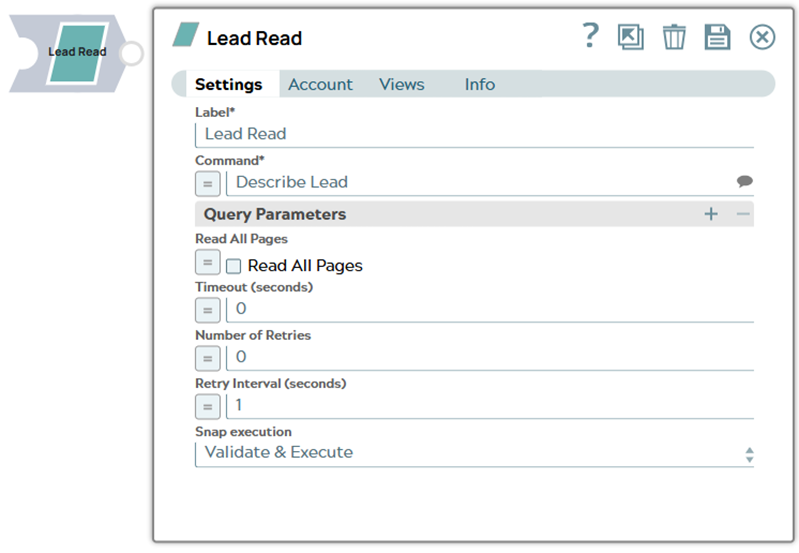
| Field/Field set | Description |
|---|---|
Label*
String |
Specify a unique name for the Snap. Supports expressions.
Default value: Lead Read |
Command*
String/Expression/ Suggestion |
Specify the command to query the Lead database to retrieve leads. Alternatively, click the Suggestion icon to fetch a list of commands. Note: Some commands require specific data in the input view. In such cases, place the Mapper Snap as an upstream Snap, validate the pipeline and note the Target Schema in Mapper Snap. Refer to the Marketo Lead Database document for details of each command.
Example:
For a complete list of supported commands, refer to the Marketo Lead API documentation. |
| Query Parameters |
Use this fieldset to define the name and value for query parameters that are passed with the lead command. Note:
|
Name*
String/Expression |
Specify the name of the query parameter for retrieving leads. Example:
|
Value
String |
Specify the value for the query parameter for retrieving leads. Example:
|
Read All Pages
Checkbox |
Select this checkbox to retrieve all pages of results when the Marketo API returns paginated responses. Note: This checkbox is not available for the Get Pagination Token command.
Default value: Deselected |
Timeout (seconds)
Integer/Expression |
Specify the time in seconds to wait for a response from the Marketo server. A value of zero disables the timeout. Default value: 0 |
Number of Retries
Integer/Expression |
Specify the number of attempts the Snap must make in case of connection failure or timeout. Default value: 0 |
Retry Interval (seconds)
Integer/Expression |
Specify the minimum number of seconds the Snap must wait before each retry attempt. Default value: 1 |
Snap execution
Dropdown list |
Choose one of the three modes in
which the Snap executes. Available options are:
Default value: Validate and Execute |
Examples
Troubleshooting
| Error | Reason | Resolution |
|---|---|---|
| MAX RATE LIMIT '100' EXCEEDED WITHIN '20' SECS'. | When a number of Pipelines run in parallel, the number of calls made within 20 seconds exceeded 100. | Refer to the Marketo documentation for resolution. |
| Concurrency Limit: Maximum of 10 concurrent API calls. | The concurrent API calls must have exceeded 10 calls. | Ensure to avoid more than 10 concurrent API calls. |
| TOTAL MEMBERSHIP SIZE EXCEEDS THE LIMIT ALLOWED (100000) FOR THE FILTER. | The number of program members exceeds 100,000. |
Set the filter such that the Snap can fetch only less than 100,000 records. Refer to Program Members in the Marketo documentation for more details. |
| Daily quota limit of API calls exceeded. | Most subscriptions are allocated 50,000 API calls per day (which resets daily at 12:00 AM CST). |
Daily Quota: The maximum number of allocated API calls per day for most subscriptions is 50,000. Refer to Marketo documentation for best practices. |
| 1003, Too many results match the filter in case the Get Leads by Filter Type data is greater than 1000. | Marketo Get Leads by Filter Type command will fail if the lead filter is greater than 1000. |
The Lead filter value must be lower than 1000. Refer to Leads documentation for more information. |