


Dropbox Get Tags
This Snap retrieves tags associated with files in Dropbox.
Supported Accounts
- This is a Write-type Snap.
 Works in Ultra Tasks
Prerequisites
None.
Limitations and known issues
None.
Snap views
| Type | Description | Examples of upstream and downstream Snaps |
|---|---|---|
| Input | This Snap accepts the file path to query for tags. |
|
| Output | This Snap outputs the tags associated with the specified file. |
|
| Learn more about Error handling. | ||
Snap settings
Note: Learn about
the common controls in the Snap settings dialog.
| Field/Field set | Description |
|---|---|
|
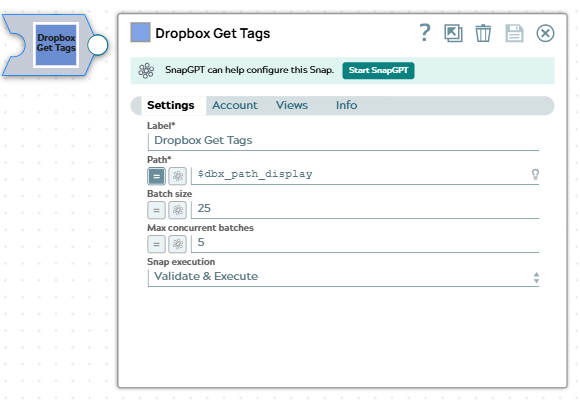
Label
|
Specify a unique name for the Snap. Modify this to
be more appropriate, especially if there are more than one of the same Snap in the
pipeline.
Default value: Dropbox Get Tags |
| Path*
|
The path to the file in Dropbox for which to retrieve tags. The path should start with a forward slash (/).
Example: Default value: None |
| Batch size
|
Specify the number of file paths to process in each batch. This setting controls how many files are queried for tags in a single API request.
Note: Set the Batch size to 1 if your pipelines run in Ultra mode.
Example: Default value: 25 |
| Max concurrent batches
|
Specify the maximum number of batches to process concurrently. This setting controls the parallelism level when processing multiple file paths.
Note: Set the Max concurrent batches to 1 if your pipelines run in Ultra mode.
Maximum value 10 Example: Default value: 5 |
| Snap execution
|
Choose one of the three modes in
which the Snap executes. Available options are:
Default value: Validate & Execute |