


SQS Consumer
Overview
This Snap consumes the messages from the Amazon Simple Queue Service (SQS).
- This is a Read-type Snap.
 Works in Ultra Tasks
Prerequisites
- Valid AWS Account and SQS access.
- Authentication such as IAM Role access, Access key, and Security Access key.
Known issues
The AWS extended library uses S3 only when the message size is more than 256 KB. However, you cannot enable the Client-side buffering checkbox when you select the Enable Large Message Support checkbox in your SQS Account.
Snap views
| Type | Description | Examples of upstream and downstream Snaps |
|---|---|---|
| Input | This Snap has at most one document input view. The input document must contain the keys ReceiptHandle and QueueURL. |
|
| Output |
This Snap has exactly one document output view. This Snap generates a Binary output that contains the Message body and a header. The header contains the queue URL, receipt handle, and message attributes. |
|
| Learn more about Error handling. | ||
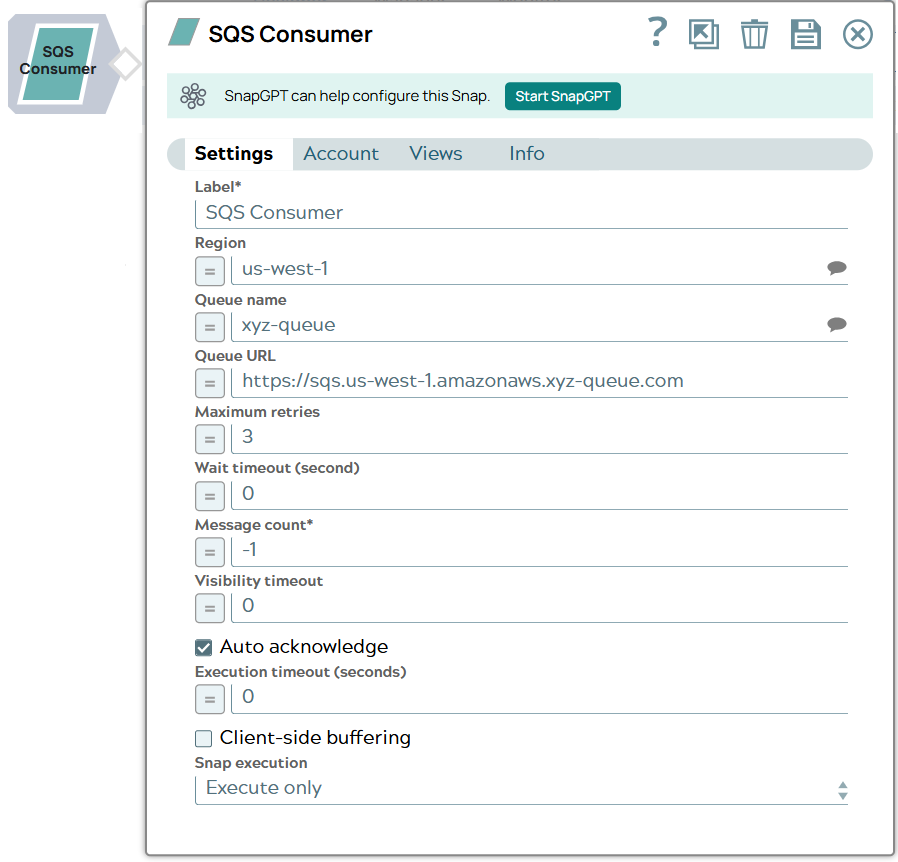
Snap settings
| Field/Field set | Description |
|---|---|
|
Label
|
Specify a unique name for the Snap. Modify this to be more appropriate, especially if more than one of the same Snaps is in the pipeline. Default value: SQS Consumer Example: SQS Consumer |
| Region
|
Specify the AWS region where the application is implemented. Default: None Example: us-east-1, us-west-1 |
| Queue name
|
Specify the name of the target Queue. Warning: The FIFO Queue must end with a '.fifo'. suffix. Default value: None. Example: xyz-queue |
| Queue URL
|
Specify the URL for the Queue. This can be found through the AWS console. When a new queue is created with a unique name, the Amazon SQS assigns each queue with an identifier called a queue URL that includes the queue name and other SQS components. This URL will override the queue specified in Queue name property. The URL must be in this format: Default value: None Example:https://sqs.us-west-1.amazonnaws.xyz-queue.com |
| Maximum retries
|
Specify the maximum number of retry attempts for a failed request. Important:
Default value: 3 Example: 3 |
| Wait timeout (Second)
|
Specify the maximum time in seconds the Snap waits for each fetching. A zero
wait timeout means that short polling is performed. Otherwise, long polling is
performed. If the wait timeout is set to 0, the queue attribute, Receive Message
Wait Time, is used. Default value: 0 Example: 2 |
| Message count
|
Required.Specify the number of messages to read before
consuming stops. If this value is set to 0, the Snap reads all available messages
and returns. If the count is less than 0, the Snap waits indefinitely. The maximum
number of messages (up to 10) can be configured, however a particular message from
the queue cannot be requested. Warning: When you validate the Snap, the
Snap consumes only one message irrespective of the message count. Default value: -1 Example: 2 |
| Visibility timeout
|
The SQS sets a visibility timeout to prevent other consumers from re-processing
the same message from a queue. Visibility timeout is a period of time during which
Amazon SQS prevents other consumers from receiving and processing the message. Click here for more information. Default value: 0 Example: 10 |
| Auto acknowledge
|
Select this checkbox to automatically acknowledge the message after it is
received by the Snap. Default status: Deselected |
| Execution timeout (seconds)
|
Specify the maximum time in seconds that the Snap waits for the execution to
complete. If the time exceeds, the Snap stops processing and completes execution.
The defaule value of 0 inidcates no timeout. Note:
Default value: 0 Example: 30 |
| Client-side buffering
|
Select this checkbox to enable the Snap buffer up to 10 outbound requests and
send them in batch, instead of sending each request separately. It allows
pre-fetching of messages when consuming. The Amazon SQS Buffered Asynchronous Client
currently does not support the FIFO queues. Default status: Deselected |
| Buffer configurations | Appears when you select Client-side buffering checkbox. The configurations for the client-side buffer. |
| Max buffer size
|
Specify the maximum number of messages that are batched together in a single
request. The higher the setting, the fewer batches are required to carry out the
same number of requests. The maximum batch size is 10. Default value: 10 Example: 5 |
| Max buffer open time (ms)
|
Specify the maximum buffer wait time in milliseconds before sending out the
request. Default value: 200 Example: 10 |
| Max outbound batches in parallel
|
Specify the maximum number of concurrent batches for each type of outbound
request. The greater the number, greater the throughput that can be achieved (at the
expense of consuming more threads). Default value: 5 Example: 10 |
| Max batches prefetching
|
Specify the number of receive batches the Snap pre-fetches for client-side
buffering. Default value: 10 Example: 6 |
| Max inbound batches in parallel
|
Specify the maximum number of inbound batches that are processed in parallel.
The higher the setting, the more messages can be received (at the expense of
consuming more threads). If the property is set to 0, the pre-fetching is
disabled. Default value: 10 Example: 15 |
|
Snap execution Dropdown list
|
Choose one of the three modes in
which the Snap executes. Available options are:
Default value: Execute only Default value: Validate & Execute |