


Bulk Lead Extract
Overview
You can use the Bulk Lead Extract Snap to fetch large number of leads from the Lead database.
- This is a Read-type Snap.
 Works in Ultra Tasks
Prerequisites
- A valid Marketo OAuth2 Account.
- Valid permissions for bulk lead extraction. Refer to the Marketo Bulk Extract API documentation.
Limitations
- Daily Quota: The subscriptions are allocated 50,000 API calls per day (which resets daily at 12:00AM CST).
- API Rate Limit: All Marketo APIs are rate-limited. The API access per instance is limited to 100 calls per 20 seconds.
- Concurrency Limit: You can make a maximum of 10 concurrent API calls.
- Out of the variety of filter types that Marketo supports, this Snap supports only
createdAtfilter type which uses a date range (start and end dates) for bulk extraction of leads.
Known issues
- This Snap results to empty output if you select the JSON format. The preview result is displayed only if you select the Table format.
- Marketo Snaps do not support some special characters (for example, (
𝖖𝖗𝖘𝖬𝖭𝖮𝗕𝗖𝘧𝘨𝘩𝛀𝛁𝛂𝛃𝛄𝛅𝛆𝛇,𝖗𝖘𝖬𝛌𝛗𝛘𝛙𝛴)).
Snap views
| Type | Description | Examples of upstream and downstream Snaps |
|---|---|---|
| Input | This Snap has at most one document input view. Requires the Export format with Start and End date to retrieve leads from Lead database. | Mapper |
| Output | This Snap has at most one binary output view. The exported data from Lead database. | |
| Learn more about Error handling. | ||
Snap settings
| Field/Field set | Description |
|---|---|
Label*
String |
Specify a unique name for the Snap. Supports expressions.
Default value: Bulk Lead Extract |
Timeout (seconds)
Integer/Expression |
Specify the time in seconds to wait for the bulk lead extraction to complete before it times out. A value of zero disables the timeout. Default value: 0 |
Number of Retries
Integer/Expression |
Specify the number of attempts the Snap must make in case of connection failure or timeout. Default value: 0 |
Retry Interval (seconds)
Integer/Expression |
Specify the minimum number of seconds the Snap must wait before each retry attempt. Default value: 1 |
Export Format*
Dropdown list |
Select the format for the exported lead data:
Default value: CSV |
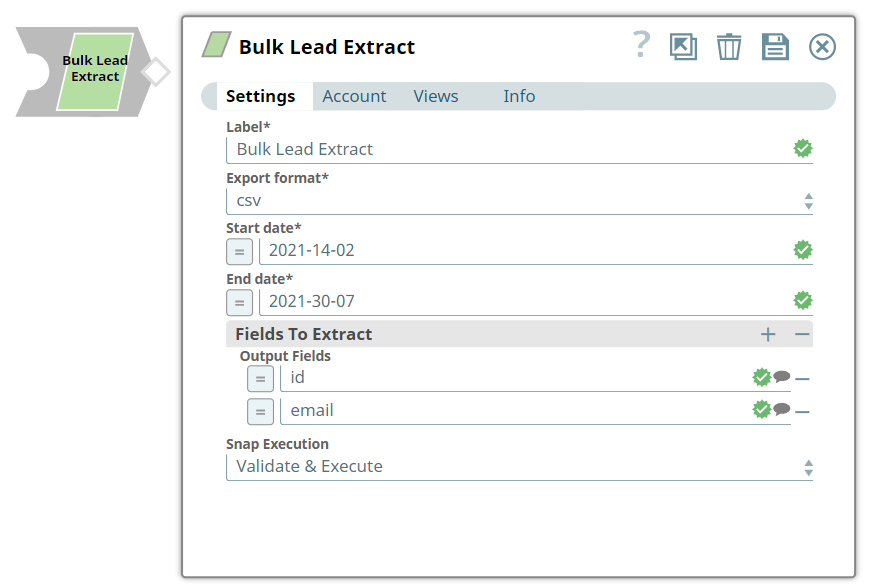
Start Date*
String/Expression |
Specify the start date of the date range for the bulk lead extraction. Use the
format Note: Currently, the only supported format is
YYYY-MM-DD as a string.Example: 2024-01-01 |
End Date*
String/Expression |
Specify the end date of the date range for the bulk lead extraction. Use the
format Note: Currently, the only supported format is
YYYY-MM-DD as a string.Example: 2024-01-31 |
| Fields to Extract |
Use this fieldset to specify the lead fields to include in the exported data. If not specified, all fields are included. |
Output Fields
String/Expression |
Specify the API name of a lead field to include in the export. Example: email, firstName, lastName, company |
Snap execution
Dropdown list |
Choose one of the three modes in
which the Snap executes. Available options are:
Default value: Validate and Execute |