


Active Directory Authenticate Users
Overview
The Active Directory Authenticate Users Snap authenticates Active Directory user credentials against an LDAP server through the authentication API.
This Snap returns whether a given user entry (Username and Password combination) is valid in the Active Directory instance.
- This is a Transform-type Snap.
 Works in Ultra Tasks
Supported Accounts
Prerequisites
- A valid account with the required permissions.
Snap views
| Type | Description | Examples of upstream and downstream Snaps |
|---|---|---|
| Input |
This Snap has at most one document input view. A document with the user's LDAP credentials (username and password). |
|
| Output |
This Snap has exactly one document output view. A document containing the authentication result (success or failure). |
|
| Learn more about Error handling. | ||
Examples
Verifying the Username and Password against the Active Directory
Snap settings
| Field/Field set | Description |
|---|---|
Label
String |
Specify a unique name for the Snap. Modify this to be more appropriate, especially if more than one of the same Snaps is in the pipeline. Default value: Active Directory Authenticate Users Example: AD Auth User |
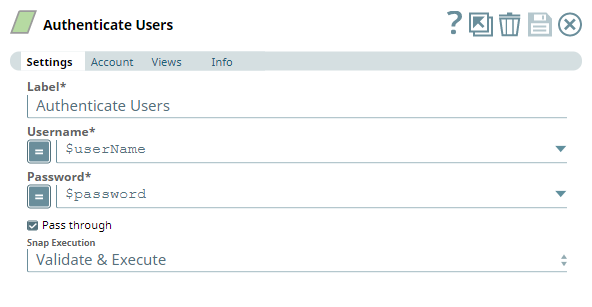
Username
String/Expression |
Required. Username of the user. This value can be passed as a Pipeline parameter or through an input document. Example: JohnDoe |
Password
String/Expression |
Required. The password associated with the Username provided. This value can be passed as a Pipeline parameter or through an input document. Example: sFispGq@j3o! |
Pass through
Checkbox |
Select this check box to specify whether the data in the incoming document must be passed through and merged with the output document. If selected, the input document is passed through to the output view under the key Default value: Selected |
Snap execution
Dropdown list |
Choose one of the three modes in
which the Snap executes. Available options are:
|
Troubleshooting
| Error | Cause | Resolution |
|---|---|---|
| [LDAP: error code 49 - 80090308: LdapErr: DSID-0C090446, comment: AcceptSecurityContext error, data 52e, v2580] | The Snap execution is successful, but the value provided as password is not valid. | Ensure that the password provided in the Snap is valid/correct. |
| Failed to validate account: Connection error occurred due to invalid credentials or configuration | Connection error occurs due to invalid credentials or configuration. | Ensure that the provided Snap account credentials are valid, and any additional configuration (if required) is completed. |