


Veeva Document Upload
Overview
The Veeva Document Upload Snap uploads documents to Veeva Vault.
Use this Snap to upload file content to existing document records in Veeva Vault.
Supported Accounts
- This is a Write-type Snap.
 Works in Ultra Tasks
Snap views
| Type | Description | Examples of upstream and downstream Snaps |
|---|---|---|
| Input |
This Snap has exactly one document input view. The input document should contain the document ID and the file content or file path to upload. |
|
| Output |
This Snap has exactly one document output view. The output document contains the response from Veeva Vault, including the upload status. |
|
| Learn more about Error handling. | ||
Snap settings
| Field/Field set | Description |
|---|---|
| Label*
|
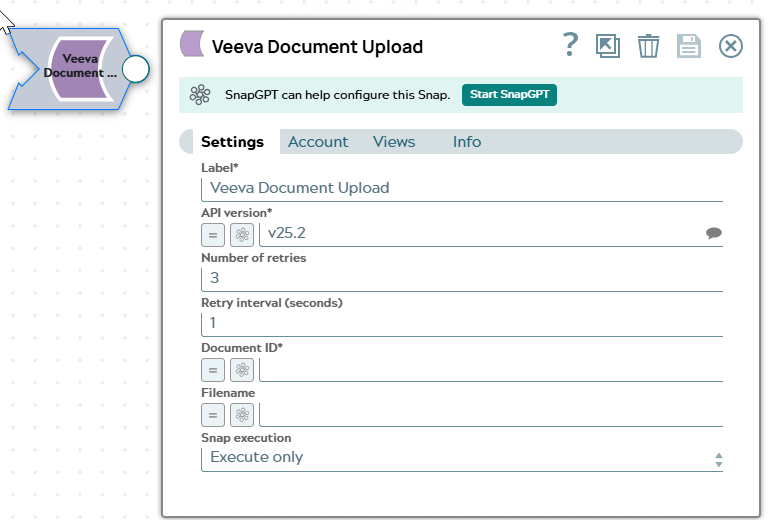
Specify a unique name for the Snap. Modify this to be more appropriate, especially if more than one of the same Snaps is in the pipeline. Default value: Veeva Document Upload |
| API version*
|
The Veeva Vault API version to use for this Snap. Default value: v25.2 Example: |
| Number of retries
|
The number of retry attempts for failed API calls. The Snap retries the request if it receives a transient error from Veeva Vault. Default value: 3 Example: |
| Retry interval (seconds)
|
The time interval in seconds between retry attempts. Default value: 1 Example: |
| Document ID*
|
The ID of the document to upload. If not specified, a new document is created. Default value: N/A Example: |
| Filename
|
The filename for the uploaded document. Default value: N/A Example: |
|
Snap execution Dropdown list
|
Choose one of the three modes in
which the Snap executes. Available options are:
Default value: Execute only |