


Tc Requirement Structure Create: Create Requirement Structure
This example shows the input document that creates a requirement structure together with its elements.
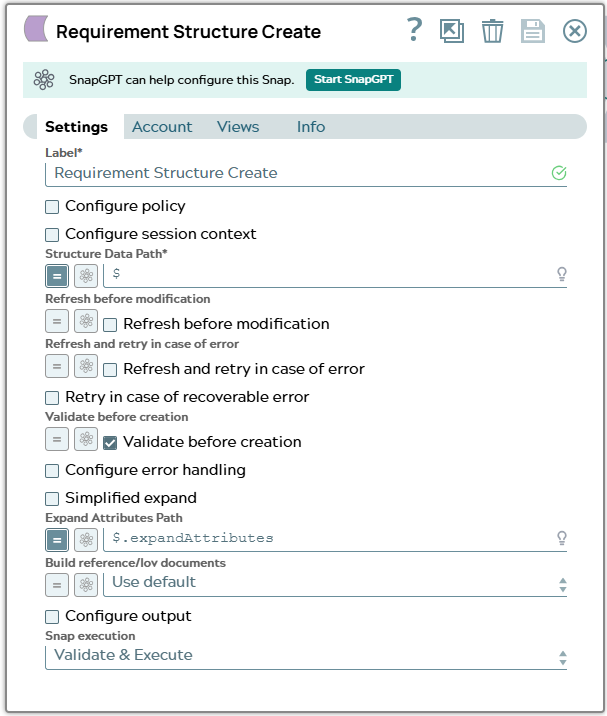
In the snap configuration following values has to fed into fields
- $ to Structure Data Path
- $.expandAttributes to Expand Attributes Path
The JSON object “lineObject” contains information about to be created Teamcenter object. Mandatory is “object_type” as it defines the type of the object to be created. In case of mandatory attributes for creation these attributes have to be defined in “lineObject” too. Requirement objects can contain rich content. This content can be send to Snap in JSON property “[richContent]” as demonstrated for paragraph P1. Since a structure shall be composed with the Snap “Tc Requirement Structure Create” the subelements are organized in “children” list in top element. Next to “lineObject” the JSON element “lineData” can contain attributes for relation between sub and top element.
[
   {
        "lineObject": {
        "object_type": "RequirementSpec",
        "object_name": "SnapTestSpec",
        "object_desc": "Spec Desc"
      },
      "children": [
        {
          "lineObject": {
            "object_type": "Paragraph",
            "object_name": "P1",
            "object_desc": "P1 Desc",
            "[richContent]": "<p>Req1 Desc</p> <p><b>Some Content</b></p>"
          },
          "lineData": {
          },
          "children": [
            {
              "lineObject": {
                "object_type": "Requirement",
                "object_name": "Req1",
                "object_desc": "Req1 Desc"
              },
              "lineData": {
              }
            }
          ]
        },
        {
          "lineObject": {
            "object_type": "Paragraph",
            "object_name": "P2",
            "object_desc": "P2 Desc"
          },
          "lineData": {
          },
          "children": [
            {
              "lineObject": {
                "object_type": "Requirement",
                "object_name": "Req2",
                "object_desc": "Req2 Desc"
              },
              "lineData": {
              }
            }
          ]
        }
      ],
      "expandAttributes": [
        "object_name",
        "object_desc",
        "object_type",
        "object_string"
      ]
    }
]
This will create a new requirement structure like:
SnapTestSpec |--P1 |--Req1 Desc |--P2 |--Req2 Desc
Snap configuration | Snap output |
|---|---|
 | |