


Teradata Database Account
Overview
Use this account type to connect Teradata Snaps to a Teradata database using JDBC credentials. By providing the hostname, database name, and valid user credentials, this account establishes the connection required to read from and write to Teradata.
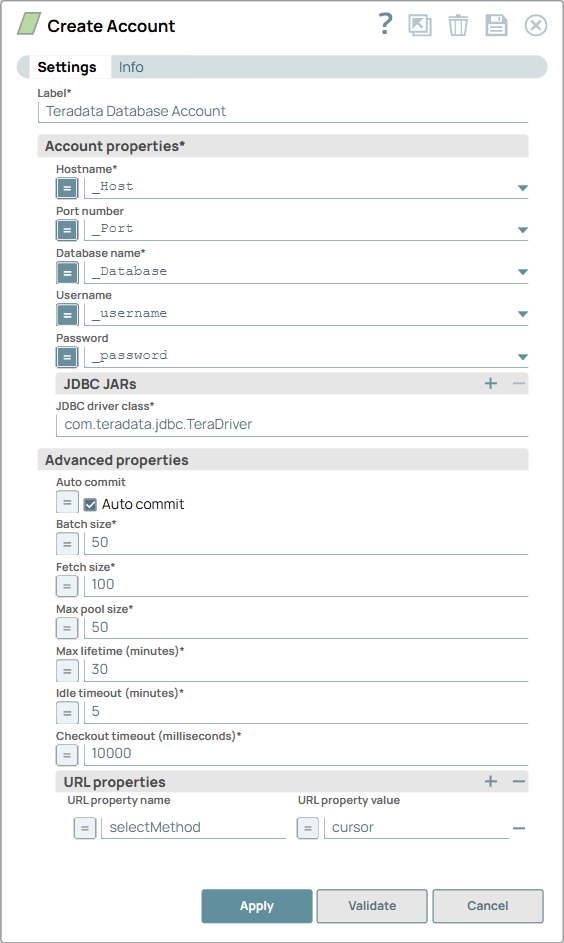
Prerequisites
- A running Teradata database server.
- Valid Teradata database credentials (username and password).
Account settings
- Expression icon (
 ): Allows using
JavaScript syntax to access SnapLogic Expressions to set field values dynamically (if
enabled). If disabled, you can provide a static value. Learn more.
): Allows using
JavaScript syntax to access SnapLogic Expressions to set field values dynamically (if
enabled). If disabled, you can provide a static value. Learn more. - SnapGPT (
 ): Generates SnapLogic Expressions
based on natural language using SnapGPT. Learn
more.
): Generates SnapLogic Expressions
based on natural language using SnapGPT. Learn
more. - Suggestion icon (
 ): Populates a
list of values dynamically based on your Snap configuration. You can select only one
attribute at a time using the icon. Type into the field if it supports a comma-separated
list of values.
): Populates a
list of values dynamically based on your Snap configuration. You can select only one
attribute at a time using the icon. Type into the field if it supports a comma-separated
list of values. - Upload
 : Uploads files. Learn more.
| Field/Field set | Description |
|---|---|
Label*
String |
Required.Specify a unique label for the account. Default value: N/A Example: Teradata account |
Account properties
Fieldset |
Connection settings for the Teradata database. |
Hostname
String/Expression |
Required. Specify the hostname or IP address of the Teradata database server. Default value: N/A Example: teradata.example.com |
Port number
String/Expression |
Specify the port of the Teradata database server. Note: Specifying a port may cause the address to be parsed as an IPv6 address;
use with care.
Default value: N/A Example: 1025 |
Database name
String/Expression |
Required. Specify the name of the Teradata database to connect to. Default value: N/A Example: sales_db |
Username
String/Expression |
Specify the username to use when connecting to the database. Used as the default username when retrieving connections. The username must be valid to set up the data source. Default value: N/A Example: td_user |
Password
String/Expression |
Specify the password for the database connection. Used as the default password when retrieving connections. The password must be valid to set up the data source. Default value: N/A Example: Encrypted |
JDBC jars
String/Expression |
Specify any JDBC JAR files to load. Each driver binary must have a unique name. If left blank, the default JDBC driver is loaded. Default value: N/A |
JDBC driver class
String/Expression |
Required. Specify the JDBC driver class name to use. Default value: |
Advanced properties
Fieldset |
Connection pool settings for managing Teradata database connections. |
Auto commit
Checkbox |
When selected, each batch is committed immediately after execution. If the Snap fails, only the batch in progress is rolled back. When deselected, output is committed only after all batches complete; if the Snap fails, the entire transaction is rolled back. Default value: Selected |
Batch size
Integer/Expression |
Required. Specify the number of statements to execute
at a time.
Note: Select queries are not batched. Large values may exceed the JDBC
placeholder limit of 2100. Default value: 50 Example: 100 |
Fetch size
Integer/Expression |
Required. Specify the number of rows to fetch at a time when executing a query. Note: Large values could cause the server to run out of memory.
Default value: 100 Example: 500 |
Max pool size
Integer/Expression |
Required. Specify the maximum number of connections the pool maintains at a time. Default value: 50 Example: 100 |
Max life time
Integer/Expression |
Required. Specify the maximum lifetime (in minutes) of a connection in the pool. Set this value a few seconds shorter than any database or infrastructure-imposed connection time limit. A value of 0 indicates an infinite lifetime, subject to the Idle Timeout setting. In-use connections are never retired; connections are removed only after they are closed. Default value: 30 Example: 60 |
Idle timeout
Integer/Expression |
Required. Specify the maximum time (in minutes) a connection may sit idle in the pool. A value of 0 means idle connections are never removed from the pool. Default value: 5 Example: 10 |
Checkout timeout
Integer/Expression |
Required. Specify the number of milliseconds to wait for a connection when the pool is exhausted. A value of 0 causes the Snap to wait indefinitely; SnapLogic recommends not setting this to 0. Default value: 10000 Example: 5000 |
URL properties
Fieldset |
Additional JDBC URL connection properties specified as name-value pairs. |
URL property name
String/Expression |
Specify additional JDBC URL property name. Example: |
URL property value
String/Expression |
Specify the value for the property name. Example: |