


About MCP Server Setup
Plan, configure, and deploy MCP Servers to expose your SnapLogic pipelines as tools for AI agents.
Overview
This topic provides guidance for planning and deploying MCP Servers in SnapLogic. It covers the following:
- Deployment planning: Determine which tools to expose, what pipelines are needed, and how to handle authentication and infrastructure.
- Prerequisites: Organization, pipeline, and infrastructure requirements before creating an MCP Server.
- Workflow summary: End-to-end steps from pipeline creation to monitoring.
- Best practices: Recommendations for authentication, performance, and reliability.
This topic does not contain the step-by-step procedures for setup. For a guided tutorial that walks you through getting an MCP Server up and running, see MCP Server Quick Start Tutorial. Note that the Quick Start covers a single use case. For comprehensive procedures that address a wider range of configurations and scenarios, use the associated topics linked from this page.
Server Setup Workflow
Setting up an MCP Server involves the following steps:
- Plan your deployment
- Review prerequisites
- Choose authentication types
- Set up infrastructure
- Create an MCP Server Pipeline
- Register the pipeline as an MCP Server
- Configure authentication rules
- Get the server URL and connect clients
- Monitor server requests and executions
Deployment Planning
Before creating an MCP Server, plan your deployment by addressing the following areas:
Tools
Determine which operations you want to expose as MCP tools:
- Identify the business functions AI agents should be able to invoke
- Define the input parameters each tool requires
- Specify the output format each tool returns
- Consider which existing pipelines can be adapted or need to be created
Pipelines
Ensure you have pipelines ready to expose as MCP tools:
- Pipelines must use Function Generator Snaps to define tool schemas
- Pipelines must handle both
tools/listandtools/callrequests - Consider using the MCP Server Router Snap to route requests appropriately
OpenAPI Specs
If you have existing API definitions, you can convert them to MCP tools:
- Use the OpenAPI Function Generator Snap to parse OpenAPI specifications
- The Snap automatically converts OpenAPI operations to MCP tool definitions
- Useful for exposing existing REST APIs as MCP tools without manual schema definition
APIM Services
Leverage existing APIM services as MCP tools:
- Use the APIM Function Generator Snap to convert APIM services to MCP format
- Reuse existing API governance and policies
- Maintain consistency between API and MCP tool definitions
Subscription to MCP Server Feature
Verify your organization has access to MCP Server:
- MCP Server must be enabled for your Environment (Org)
- Contact your SnapLogic administrator or account team if MCP Server is not available
- Ensure you have appropriate permissions to create assets in the target project
Plan for Authentication Method
Choose an authentication strategy based on your security requirements:
| Method | Use Case | Policy Rules |
|---|---|---|
| Anonymous | Development, internal testing only | Anonymous Authenticator |
| Define role (anonymous) | Defines role for Anonymous Authenticator | Authorize by Role |
| OAuth2 Client Credentials | Application-to-application authentication | MCP OAuth2 Client Credentials Policy |
| OAuth2 JWT | Validating tokens from external identity providers | MCP OAuth2 JWT Validator Policy |
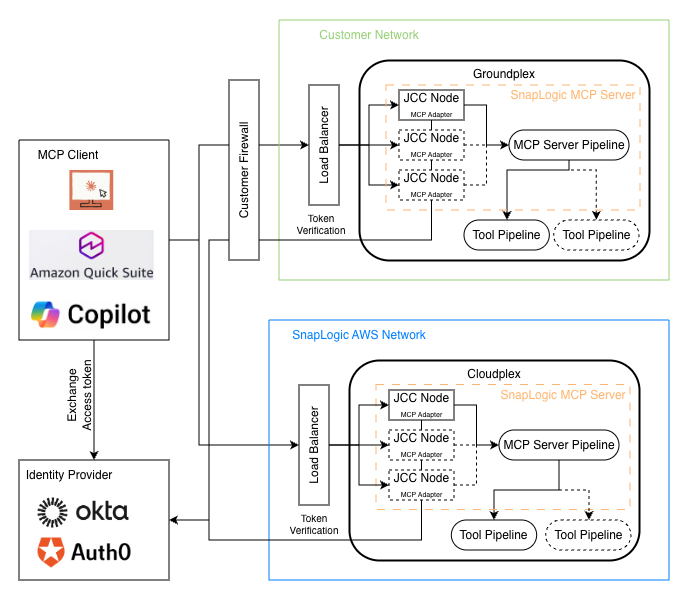
Load Balancer Requirement
You need to configure a load balancer for your Snaplex:
- Use Streamable HTTP transport (
/mcpserver/{serverId}/mcp) for stateless, scalable deployments - Configure health checks to monitor MCP Server availability
- Set appropriate timeouts at the load balancer level
Prerequisites
Before creating an MCP Server, ensure you have:
Organization Requirements
- MCP Server feature enabled for your organization
- Permissions to create assets in the target project
Pipeline Requirements
- A pipeline designed to expose as MCP tools (or ability to create one)
- Function Generator Snaps configured with tool definitions
- Logic to handle both tool listing and tool execution
Infrastructure Requirements
- Running Snaplex (Cloudplex or Groundplex) for pipeline execution
- Network access from MCP clients to the SnapLogic endpoint
For OAuth2 Authentication
- Authorization server (IDP) URL
- Client ID and Client Secret (for Client Credentials)
- JWKS endpoint access (for JWT Validator)
Workflow Summary
Follow these steps to create and deploy an MCP Server:
- Create MCP Server Pipeline: Use the MCP Server Pipeline Builder to auto-generate a pipeline from within the Create MCP Server dialog, or build it manually using Function Generator Snaps.
- Register as MCP Server: Create an MCP Server asset that references your pipeline. See Register MCP Server.
- Add Authentication Policies: Configure MCP policies for secure access. See Create Authentication Policy.
- Get Server URL and Connect Client: Retrieve the MCP Server URL and configure your MCP client. See Get Server URL and Connect Client.
- Troubleshoot MCP Server: Diagnose and resolve errors. See Troubleshooting MCP Server Errors.
Best Practices
- Start with Anonymous Authenticator and Authorize by Role rules during development: Use Anonymous authentication during development, then switch to OAuth2 for production.
- Use Ultra mode for interactive AI agents: If AI agents require fast responses, configure Ultra run policy for low-latency execution.
- Set realistic timeouts: Configure timeouts based on expected pipeline execution time plus buffer for network latency.
- Test with multiple MCP clients: Verify your MCP Server works with different clients (Claude Desktop, custom applications).
- Use descriptive error messages: Return clear error messages that help AI agents understand and recover from failures.
- Monitor regularly: Review API Metrics to identify usage patterns, errors, and performance issues.
- Document your tools: Provide clear descriptions in Function Generator Snaps so AI agents understand what each tool does.
FAQ
Can I use an existing pipeline as an MCP Server?
Existing pipelines need to be modified to work as MCP Servers. They must include the MCP Server Router Snap and follow the MCP Server pipeline pattern.
What's the difference between Triggered and Ultra run policies?
Triggered is standard execution mode suitable for most workloads. Ultra provides low-latency execution for time-sensitive operations, ideal for interactive AI agent conversations.
Do I need to create a separate MCP Server Pipeline for each tool?
No. You can define multiple tools in a single MCP Server Pipeline by chaining Function Generator Snaps. Each Snap appends its tools to the tools array.
Can I update an MCP Server without downtime?
Yes. Update the underlying Pipeline and save. Changes take effect immediately for new requests. Existing in-flight requests complete with the previous version.
What happens if my pipeline times out?
The MCP Server returns an error to the client indicating the request timed out. Increase the timeout setting if your pipeline requires more execution time.
Can I restrict which users can access my MCP Server?
Yes. Use MCP policies to control access. OAuth2 policies can restrict access based on client credentials or JWT claims. You can also use IP Restriction or Authorize By Role policies.