


Setting Up a CORS Restriction Policy for Try It Out
To enable the Try it out button for your API in the Developer Portal catalog, the API must include a CORS Restriction policy.
Important: This page describes Classic APIM. For APIM 3.0,
refer to API Management 3.0.
Overview
To enable the Try it out button for your API in the Developer Portal catalog, the API must include a CORS Restriction policy.
Prerequisites
- An existing API defined in the API Manager
Steps
-
In the API Manager, go to the API Details tab of the target API and add a CORS Restriction policy.
-
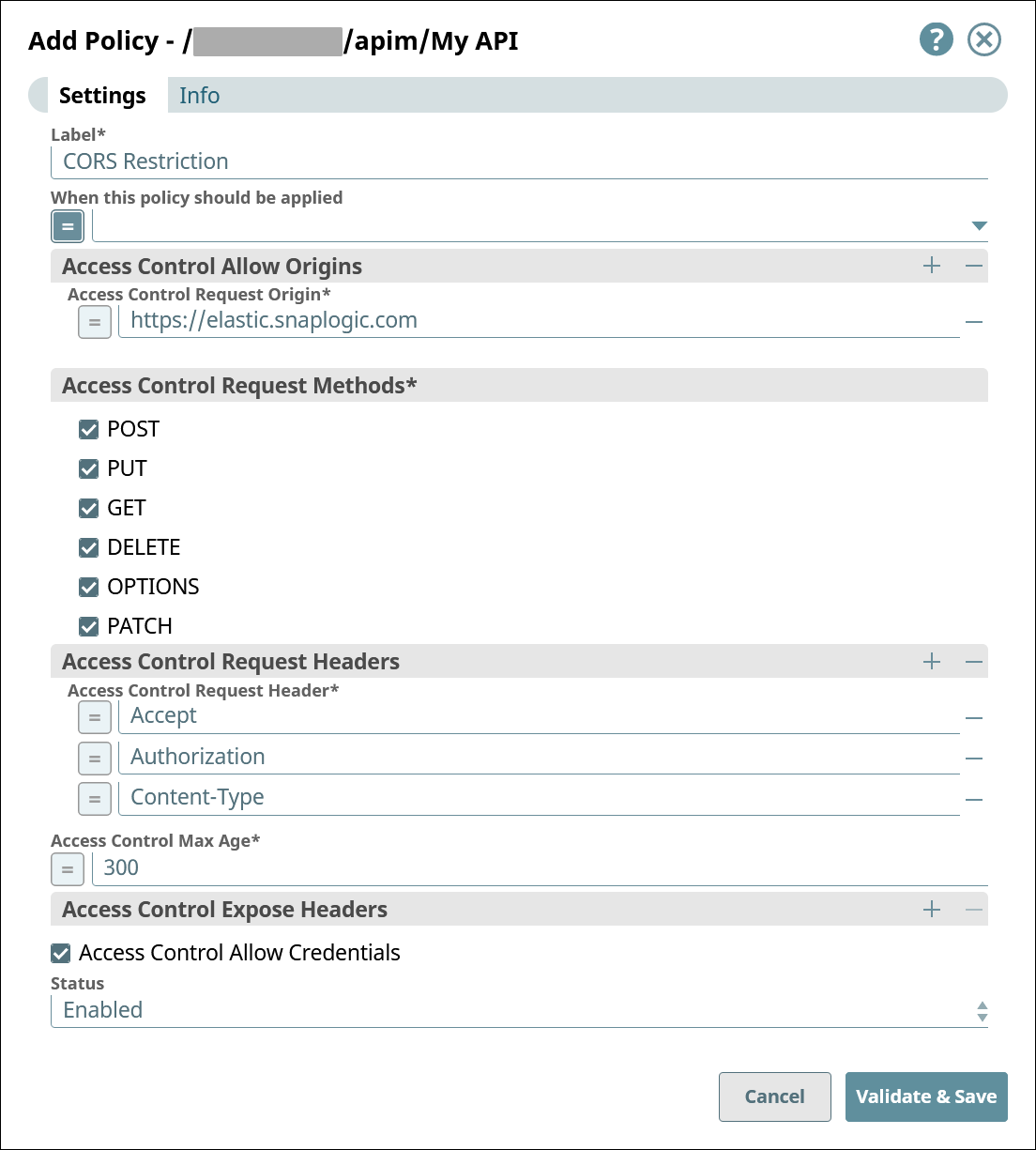
Configure the CORS Restriction Policy.
-
Add an Access Control Allow Origins entry. Set the value to the URL to your pod.
Example:
https://elastic.snaplogic.com -
Add three Access Control Request Headers entries. Set the values to the following:
AcceptAuthorizationContent-Type
-
Select Access Control Allow Credentials.
-
-
Click Validate & Save.